Content
- What is Kolab?
- So what about Thunderbird 2?
- How do I get the Source
- How does Sync Kolab sync entries?
- How can you use the custom4 field?
- Nothing is visible!
- Help, I am getting tons of duplicates!!11
- Help, My events/contacts are disappearing!!!!1
- How to write a bug? While syncing, the process suddenly stopps. How can I find out what's wrong?
- Some entries keep updating/changing all the time
- SyncKolab just wont start at all..
- How do I completely (and manually) uninstall synckolab?
- How to I setup synckolab? I have multiple Installations. What do I have to setup?
- I see nothing when I try to configure.
What is Kolab?
It loads all your contacts (from a selected address book) as well as events and todos (from the selected calendar), and synchronizes them with a selected imap folder. Where every contact is stored as an vcard and every event,todo as iCalendar. For more information http://kolab.org/
or http://wiki.kolab.org/Clients_for_Kolab2
The idea behind this is, that you can now have your contacts+calendar entries stored on the imap server. so you can actually have the same addresses on more than one computer. The kolab project has a groupware server that uses imap to exchange calendar entries and vcards. But you can also setup simple sharing in your office if you have f.e. cyrus by symlinking shared folders.
So what about Thunderbird 2?
How do I get the Source
The source is included in the xpi. You can check it out in your profile directory under extensions/{571CFACF-0F7D-49b4-BD77-E6FC7B209ADC}/chrome/content/ or if you unzip the xpi (just rename it to .zip and use you favorite unzip util).
If you want to change some code make sure to unzip the synckolab.jar conatined in this xpi and modify the files in there. Otherwise the changes wont be visible!
How does Sync Kolab sync entries?
For those interested here is a short explenation (pretty technical) on how Sync Kolab actually works.
When a sync is started (doesnt matter if its a calendar/task or adress book sync):
- get a list of all messages in the imap folder (only headers, which are cached locally. Thunderbird also makes sure that new messages are included)
- check each message header with a local database of the previous sync for a change. Message size, date and subject are used there (subject is the key value)
- if something changed or the message is new, download the message and strip everything except the message body (xml/ical/vcard). Save this part in the local sync database (=the file system)
- parse the message body into a adress book card/calendar event/task (lets call it CUR)
- get the id from CUR and check the local address book/calendar if there is an entry with the same id (lets call it ENTRY)
- if we did not find an ENTRY, save CUR in the adress book/calendar and continue
- if we found an ENTRY, make a comparison between CUR, ENTRY and LOCALDB (the entry stored in the local sync database (file system) from a previous sync)
- if CUR=LOCALDB but ENTRY!=LOCALDB -> we know we changed something locally (ie. changed the name) so update ENTRY on the server (update=delete and readd), also update the LOCALDB on the filesystem
- if CUR!=LOCALDB but ENTRY=LOCALDB -> we know the server entry changed, so we have to update ENTRY and LOCALDB
- id CUR!=LOCALDB!=ENTRY -> we know we have a local change AND soemone changed the server entry -> ask what we should do
- if CUR=LOCALDB but ENTRY is missing -> we know it has been deleted locally, so delete the entry on the server
- remember all entries already processed (so we dont check it twice)
- now go through all local entries (ENTRY) (except the one we already processed) and check:
- if ENTRY is in LOCALDB: delete it (means it has been deleted from the server since the last sync)
- if ENTRY is not in the LOCALDB: add it to the imap server
- finish up (liek make all new messages unread, and run compact to make sure its all on the server) A few Remarks:
- if you uncheck "write to IMAP", nothing will be written on the imap server. So whatever you change locally (delete/modify entries) will result in messages "update on server" or "delete on server", but that wont happen. Next sync you will get "delete locally" "update locally" messages (since nothing changed on the server, but locally you had changed). This is because the sync DB needs two syncs to be in sync again
- the "ignore entries older than XXX" applies for the timestamp on the messages AND for the calendar entries (enddate is used there). -1 will just sync all entires
- the sync interval set to 0 will still produce debug messages (like "starting sync...") which is only an indicator that the check for an interval is working (should happen once a minute) - nothing is syncd if this is the only message
- If you delete the snyc db from the filesystem (synckolab folder). Synckolab will try to resolve all differences automatically or ask you (will probably result in lots of "locally updated" messages)
- If you have problem (especially entries which are not synced at all or wrong) make sure to check in the javascript Error-Console (Fehlerkonsole) for messages. Until 1.0 debug is FULLY enabled to help track problems. There is also a pause button available that helps you track problems.
How can you use the custom4 field?
Short answer: Not at all if you are using tbird < 3.1 otherwise: it will not be touched
Long answer: Because of the way tbird saves contacts, it's not really possible to have any "invisible" field for the id. So I use the custom4 field. When using another program that writes vcards and use the custom4 field, it will stay valid (the information is saved and restored when the message is written on the server)..
Nothing is visible!
- Make sure you got a working imap connection
- delete ALL configruation lines with synckolab out of your prefs.js (make sure that thunderbird is closed before doing so)
- Try setting up synkolab agian...
- If that did not work check your prefs.js if following lines are present (if not add them):
user_pref("SyncKolab.<ContactConfigName>.ContactFolderPath", "imap://user@imapserver.com/<ContactFolder>");
user_pref("SyncKolab.<CalendarConfigName>.CalendarFolderPath", "imap://user@imapserver.com/<CalendarFolder>"); - If it still did not work please check for any messages in your javascript console and report to the mailing list
Help, I am getting tons of duplicates!!11
- you sync your entries (even tough you then have most entries 4 times) and then use something like: Duplicate Contact Manager to clean out the dupes
- (if you know 100% that all entries on all machines are the same):
You sync with ONE machine - so you have all the entries on the server, then you delete the adresses on the other machines and sync so synckolab will create the entries for you.
Help, My events/contacts are disappearing!!!!1
When it looks like you are loosing contacts/events - stop what you are doing and delete the "synckolab" folder in your profile directory.
On the next sync, synckolab will try to merge all data is available (so if some events have been deleted in the imap folder but are still there locally, they will be restored - or the other way round).
The only way synckolab deletes entries is, if there is a sync db available with the entry, but the entry is missing on either side (locally or on the imap server)! So if the sync db is missing, synckolab will only create/update entries. Deletion can only happen on "the second" sync.
Especially for the nightly version (but actually before any upgrade) you should make a backup of your data (i.e. create a copy of the imap folders you used). Synckolab is quite complex and has to work around many variables (tbird behaving weird, imap not doing what it is supposed to, the os interfering, many different special characters and fields) and bugs can always happen. If you use the nightly you can help me get rid of these and create more stable results for everyone!
How to write a bug? While syncing, the process suddenly stopps. How can I find out what's wrong?
When the sync starts fine, but does not finish, it is normally either a problem with the content parsers, some other internal bug or an interference with another extesion.
If that happens to you please follow these guidelines:
- Install a nightly build - often the problem is already fixed. (make a backup of your profile folder first.. just to be on the save side)
- if the problem persists:
- Check the javascript error console (found unter tools). Clear everything then start synckolab. In almost all cases you will find some kind of error message there. Rightclick it and copy it in the clipboard (ctrl-c)
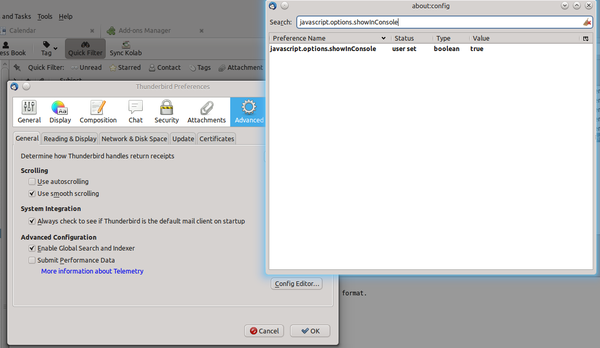
- Make sure to enable error logging first by setting javascript.options.showInConsole to true (see image). You can reach the config editor by going to Edit->Preferences->Advanced->Config Editor
- Open a new bug in bugzilla
. Make sure you add:
- Thunderbird Version
- SyncKolab version (if a nightly, make sure to add the date/time as well)
- a description what's going on
- the copy/pasted error
- the operating system
- if you used xml or vcard/ical format
- If the error is a parsing error save the message as eml (right click -> save As) and either attach the message to the bug or - if it contains sensetive information you don't want to see everyone - send directly to me via email (attach the eml)
- information from the error console (Tools/Error Console):
- with always updating/deleting/reappearing entries: there should be a 'not equals XX/XX' message
- with "unknown" entries there should be a 'parsing error' somewhere
- with stopping in the middle of the sync problems check for an 'exception'
- Especially when you experience parsing errors or incompatibilities with other kolab clients make sure to either attach the message or send me as attachment (first do rightclick-save as to save the message as eml and then send this)
- If possible add how I can reproduce the problem
Some entries keep updating/changing all the time
You have to remember that "changing local" will happen most of the time, when you change a config, because of the sync-db deletion (It actually means more "found nothing"). It's just the way the logic works right now. I will add some code later to give a more meaningfull message.
Now, when you have some contact entries that are messed up all the time, it is an indicator that one field or another is not correctly parsed - thus it is ALWAYS changed. What field it is, can be found in the error console. SK will write
not equals [FIELDNAME] 'value1' vs. 'value2'
example:
not equals NickName 'niko' vs. 'Niko'
for each field it can not match up. If something looks weird there, write that in the defect on bugzilla - this allows me to quickly track down and fix the problem.
SyncKolab just wont start at all..
- Check if it is configured correctly
- check if there are any errors in the error console (see above)
- try uninstalling some other extensions, maybe it's just a cross-extension problem
How do I completely (and manually) uninstall synckolab?
- CLOSE thunderbird!!!
- Find your thunderbird profile folder
- Remove all hdb files (*.hdb the sync databases)
- delete the synckolab folder
- Edit your prefs.js and remove all lines containing "SyncKolab"
- delete the extensions{571CFACF-0F7D-49b4-BD77-E6FC7B209ADC} folder (this is the extension itself)
# clean out synckolab
cd ~/.mozilla-thunderbird/*.default
rm *hdb
rm -rf synckolab/
cp prefs.js prefs.js.bak
cat prefs.js.bak | grep -v SyncKolab > prefs.js
# remove actual extension
rm -rf extensions/{571CFACF-0F7D-49b4-BD77-E6FC7B209ADC}
How to I setup synckolab? I have multiple Installations. What do I have to setup?
Before syncing for the first time, make a backup. (https://support.mozillamessaging.com/en-US/kb/profiles ). In case something goes wrong you can just copy the backup over the original folder on your hard drive and have all your contacts etc. back.
You have to create the imap folders you want to sync first. Just create one for each group of elements you want to sync (i.e. one folder for contacts, one for events, one for tasks). The names or where they are located do not really matter, since you can select them anyways. They have to be visible in the "real folders" first - just right-click and you can create new subfolders)
I see nothing when I try to configure.
Normally, when you setup syncklolab you should see a tree with your imap accounts to configure.If this is not the case with you, make sure to check a few things:
- Make sure that you have at least one IMAP account setup (synckolab does not work with POP!)
- Check if you have at least one address book other than "collected" addresses
- If no Calendar has yet been created, create one.
- Make sure not to use the "collected address" address book for sync. Use another one (you can copy collected addresses to this).
- If sync suddenly stops or you do not see anything in the cnfiguration window, make sure to enable javascript errors by adding following line in your prefs.js (located in your profile folder)
user_pref(“javascript.options.showInConsole”, true);Make sure Thunderbird is CLOSED when editing this file, otherwise it will be overwritten! - You can manualle set the logging level to debug by adding:
user_pref("SyncKolab.debugLevel", 3);to your prefs.js. This should give more output when even configuration does not seem to work. - Try installing the most current nightly from http://www.gargan.org/en/Mozilla_Extensions/SyncKolab/CVS_Nightly/ (but make a backup of your data first!)